Conversation notes for iPhone

“Wait, what did
we say back then?”

No record button. It remembers

One record, three uses.

Leave it on and keep your iPhone in your pocket. Your day’s conversations are saved as text. Ask Claude, Grok, Muse and more about them later. Get a diary every morning. Get minutes for each conversation. All from the same record of your day.

iPhone (iOS 26 or later) · Recording is free. AI features: 14 days free, then the price shown on the App Store

Did Sarah from Sunny Goods and I decide anything about the estimate last week?
Searching Ears for AI
Yes, at your meeting in SoMa on Tuesday, Oct 13, around 10:30. You agreed to narrow the maintenance scope and resubmit the estimate at $12,000, and to send the revised version by Friday. It’s also on your to-do list.
10/13 10:30 SoMaEvent: Sunny Goods meeting
I sent it, so you can mark that to-do as done
Completed a to-do
Marked “Send Sarah the revised estimate” as done.

All three come from the same record of your day. You need Ears for AI’s AI features (14 days free, then the price shown on the App Store) and the Claude, Grok, Muse or other AI you already use (Claude works on its free plan too).

Every morning

Yesterday,
written up for you.

After your day cut-off (3 AM in your time zone by default; you can change it), Ears for AI turns the past 24 hours of conversations into a diary, a summary and minutes. Pick as many as you like (a summary and a diary to start).

Diary

Tuesday, October 13

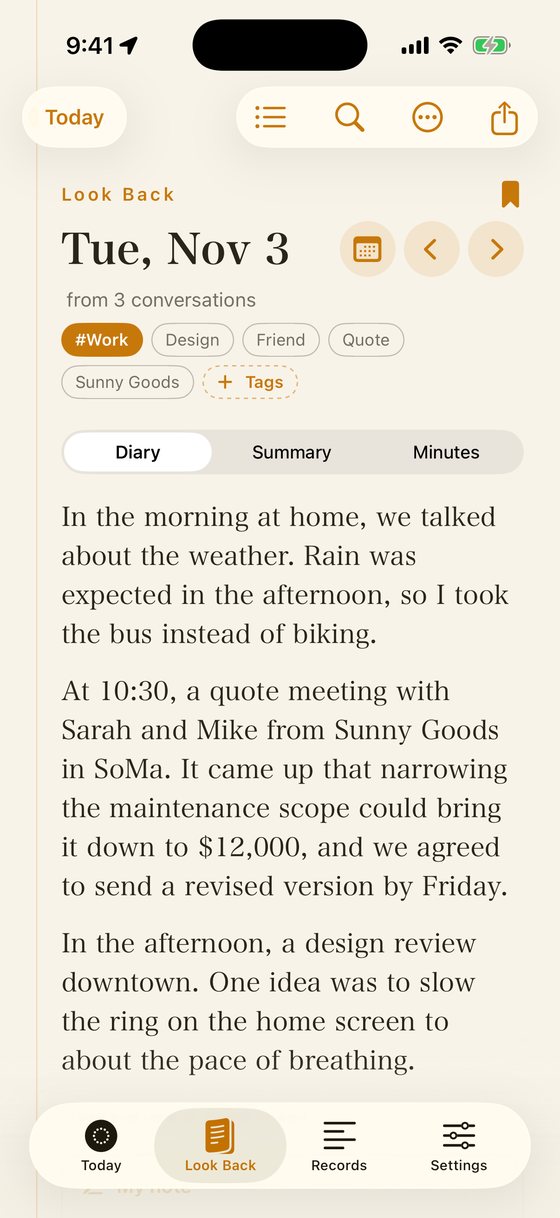
In the morning, it came up that it would rain in the afternoon, so I took the bus instead of my bike. At 10:30, I met Sarah and Mike from Sunny Goods in SoMa. We agreed to narrow the maintenance scope and resubmit the quote at $12,000. The revised quote is due by Friday. In the afternoon, there was a design review downtown, and an idea came up to slow the ring on the home screen to about the pace of breathing. In the evening, I had dinner in the Mission with friends from college. Someone mentioned going independent next spring.

Choose your diary style (try it)

Tone
Length
Mood

The diary sticks to what was actually said. It never makes up feelings or opinions you didn’t express.

Minutes

Sunny Goods meeting

When
Tuesday, October 13, 2026, 10:30–11:12
Where
SoMa (San Francisco, CA)
Who
Sarah, Mike (Sunny Goods)From the attendees of the calendar event
Topics
  • Revisiting the maintenance contract estimate
  • When to send the revised version
Decided
  • Narrow the maintenance scope and resubmit at $12,000
  • Send the revised version by Friday
To-dos
  • Send the revised estimateOwner: Me (estimated) · Due Fri, Oct 16
  • Get the list of equipment to be covered by maintenanceOwner: unknown · No due date

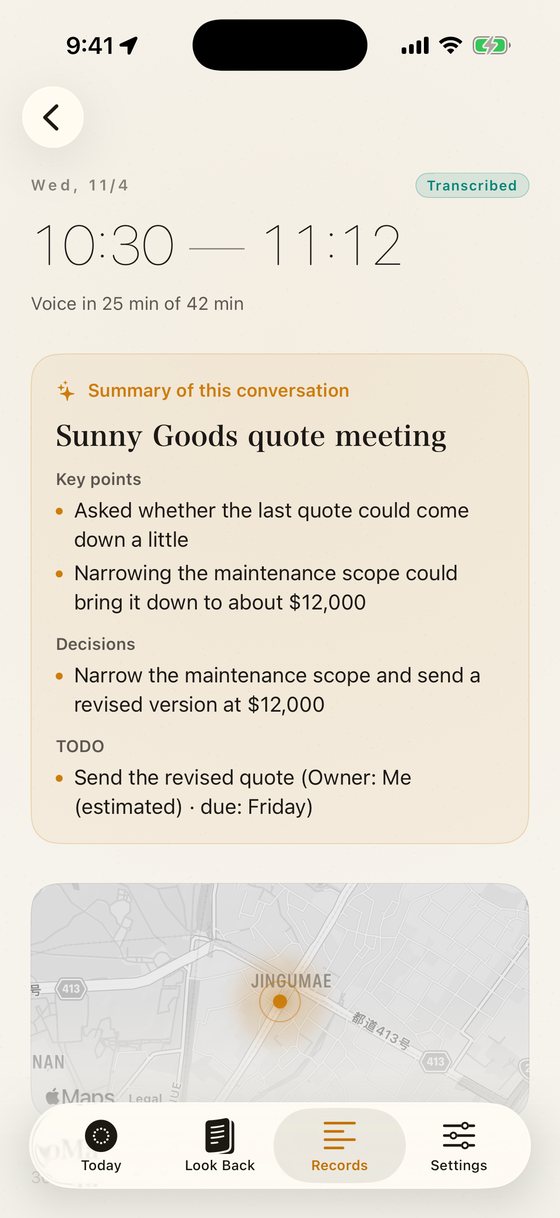
Each conversation is broken down into when, where, who, topics, decisions and to-dos (with owners and due dates). Attendees come from the calendar event at that time. Attendees and owners inferred from the conversation are marked “estimated,” and anything without solid evidence is marked “unknown.”

Summary A short note for each conversation: who you talked with, where, and about what. Weekly and monthly summaries, too.

Transcripts can contain mistakes, and they don’t tell speakers apart. Owners and due dates are picked up from what was said. For anything important, check the original transcript.

The app

Your records stay on your iPhone first.

Recording, transcribing, browsing and searching all happen on your iPhone. All of this is free, with no sign-in.

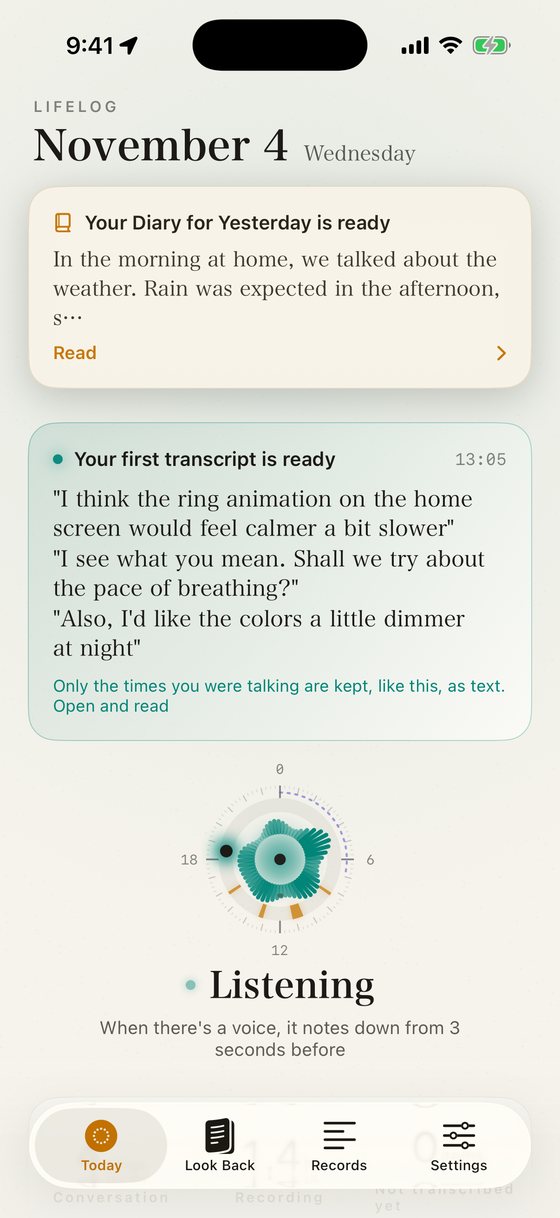
The Today screen. The times you talked light up on a 24-hour ring, with today’s number of conversations and total time
Today. The times you talked light up the ring
The Look Back screen. The day’s diary on a paper-like background
Look Back. Diary, summary and minutes every morning
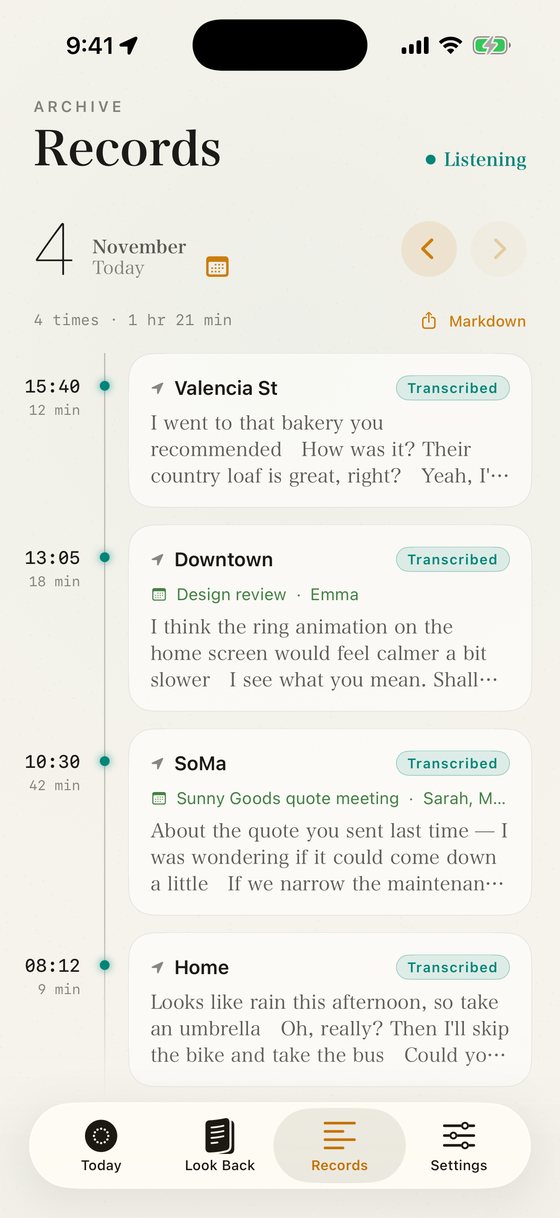
The Records list. Times and places, events and the start of each transcript
Records. In the order you talked
A single record. A map and address, the event and a timestamped transcript
Place, event and transcript
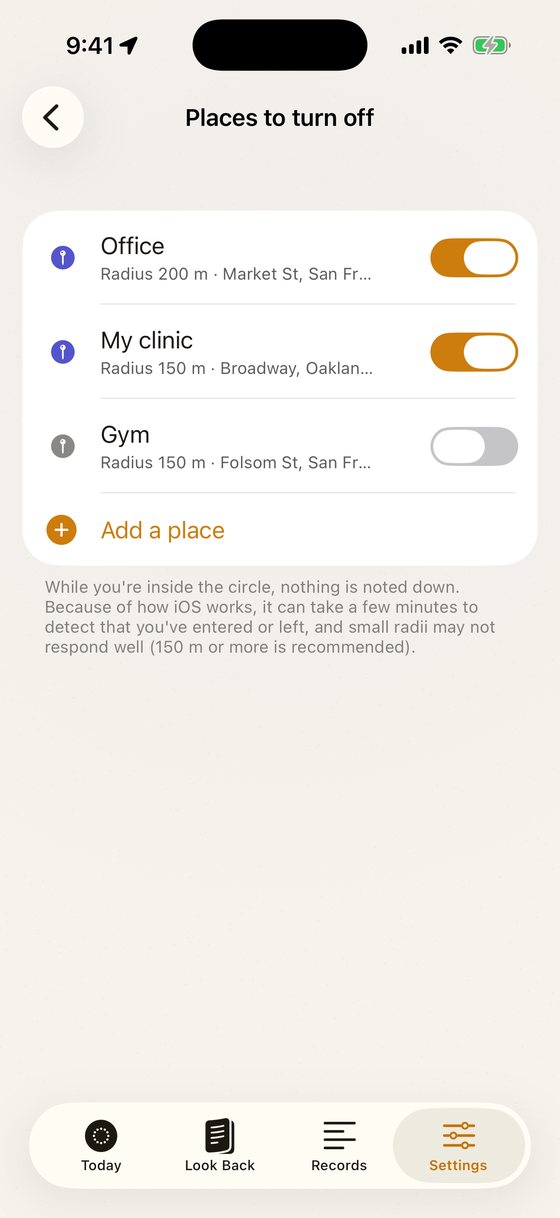
The Places to turn off setting, with a workplace and a gym added
Choose places not to record
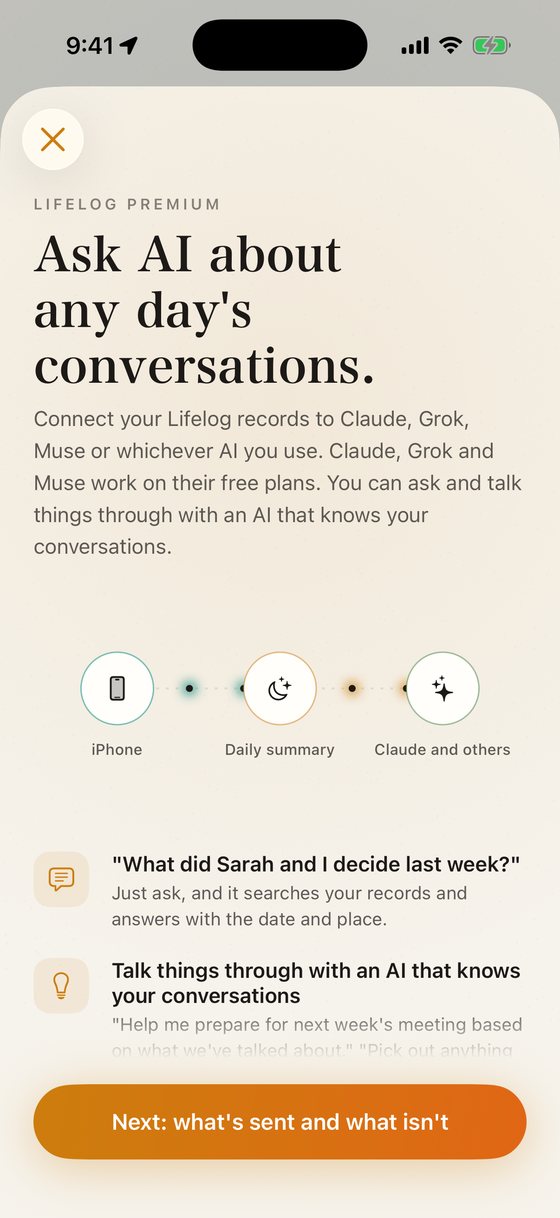
The AI features screen: ask AI about that day’s conversations
AI features (paid)

Screens are from a development build and may change before release.

The Today screen

Your day, as a ring.

Only the times you were talking light up on a 24-hour ring. When a voice starts, Ears for AI keeps the 3 seconds before it, and saves nothing while it’s quiet. You can leave out times and places you don’t want recorded, like when you’re asleep or at work.

10:30

How it works

Audio never leaves your iPhone.

Everything from recording to transcription happens on your iPhone. Only when you choose to connect AI is the text sent.

On your iPhone · Free
01

Always listening

The mic keeps listening, but nothing is saved while it’s quiet.

02

From 3 seconds before a voice

Only the times someone is talking are kept, without cutting off the first words.

03

Transcribed on your iPhone

On-device speech recognition transcribes it. Nothing is sent over the internet.

04

Then the audio is deleted

Once it’s text, the audio is gone. If you allow it, the address of the place and any overlapping calendar event are added.

AI features · Paid
05

Only text is sent, encrypted separately

It’s stored encrypted in your own private vault. Organizing and searching are done automatically by software.

06

A diary and minutes every morning

At 3 AM in your time zone by default, the past 24 hours are organized by conversation and written up in the formats you chose (summary, minutes, diary). You can change the time in Settings.

07

Ask Claude, Grok or Muse

Add Ears for AI as a connector, and the Claude, Grok, Muse or other AI you already use can search your records to answer.

For the technically minded

Context for your AI,
building up every day.

Ears for AI automatically builds up your day’s conversations, every day, as context for Claude, Grok, Muse and more. It connects to each AI as a remote MCP server, so you can pull it in from any chat, whenever you need it.

Builds up automatically, every day

Recording, transcribing, uploading and organizing by conversation all happen automatically, every day. No pasting into prompts.

Available from any chat

Connect it once as a connector, and the same records are there in new chats, inside projects, on your iPhone and on your computer.

Reads only what it needs

Search returns only conversation notes and transcript excerpts. From there, the AI reads just the conversations and time ranges it needs, so your context window isn’t wasted.

Answers grounded in the source

Answers are based on the transcripts and the notes for each conversation (when, where, who, decisions, to-dos), not on the prose of the diary or summary.

Day to day

Leave it on all day.

Automatic off by place and time

Work, the gym, when you’re asleep, a regular meeting. Add as many as you like, and nothing is saved during them.

Picks up again after calls

Recording pauses during calls or while another app is using the mic, and resumes automatically afterward. If it can’t resume, you’ll get a notification.

Adds events and places

Each record gets the calendar event and attendees at that time, plus the address where you were talking. The app asks for permission once you start using it.

See the status on your Lock Screen

The Lock Screen and the Dynamic Island show “Listening,” “Recording” or “Stopped.” If it’s stopped, one tap there starts it again.

Easy on your battery

Nothing is written while it’s quiet, and heavy transcription is saved up for when you’re charging. For the first 48 hours only, recordings are transcribed right away so you can check them on the spot.

Take it with you anytime

Export all your records as Markdown and JSON. To delete a record you don’t want, swipe left on it in the list.

Privacy

What we send, and what we don’t.

While you use it for free, nothing is sent to the server. No sign-in, either.

Never sent

  • Audio (deleted from your iPhone, too, once it’s text)
  • Your exact location (latitude and longitude)
  • During times and places you’ve turned off, nothing is recorded at all

Sent once you start AI features

  • Transcribed text (including what you recorded while on the free tier)
  • The address where you were talking
  • The names and attendees of overlapping calendar events

On the server. Your records, and the diaries, summaries and minutes made from them, are stored encrypted in your own private vault. Organizing and searching are done automatically by software, and we never read the contents. Data is stored on servers run by Cloudflare in the US, and diaries, summaries and minutes are written by Claude, an AI from Anthropic in the US.
You can delete any record. Delete it from Records in the app, and it’s removed from both your iPhone and the server. That day’s diary and summary are remade without it. For details, see our Privacy Policy.

Pricing

Recording is free.
AI features are a subscription.

Free

Ears for AI

Free

  • Recording and on-device transcription
  • Browse and search your records
  • Automatic off by place and time
  • Export as Markdown and JSON
  • No sign-in, nothing sent to the server

Paid

AI features

14 days free

Then monthly or yearly, at the price shown on the App Store

The first 14 days are free. Cancel anytime.

  • Ask Claude, Grok, Muse and more about your records, or talk things through
  • A diary, summary and minutes every morning (3 AM in your time zone by default; you can change the time)
  • Choose what to make: summary, minutes, diary (as many as you like)
  • Choose your diary style
  • Decisions and to-dos for each conversation, plus weekly and monthly summaries
  • A morning reminder to look back
  • Save records from the server as Markdown, by day or date range
  • Everything you recorded on the free tier becomes searchable too

AI you can connect

Claude

Works on the free plan too (as of November 2026)

Works on Free, Pro, Max, Team and Enterprise (the Free plan allows one custom connector). Once connected, you can ask from the Claude app on iPhone, the web, Mac or Windows.

Grok

If Connectors appears in your Grok settings (as of November 2026)

At grok.com/connectors, choose “New Connector” → “Custom,” enter the server URL and sign in with Apple. You can also connect from the Grok app on iPhone.

Muse

Just ask in chat, and it connects for you

Instead of going to settings, send the URL in the main chat with “Connect to the MCP server at this URL,” and Muse connects it for you. Then sign in with Apple. We’ve tested this on iPhone.

ChatGPT Custom connectors are a beta for Business, Enterprise and Edu; Pro can connect read-only (as of November 2026).

Based on each company’s documentation as of November 2026 and our own testing.

Download

Just keep it in your pocket
to get started.

Recording, transcription and browsing your records are free. No sign-in needed. Works on iPhone (iOS 26 or later).

Download on the App Store

FAQ

Does it work with free Claude or Grok?

Claude, yes: its free plan allows one custom connector (as of November 2026). Grok: if Connectors appears in your Grok settings, you can add Ears for AI there; Grok doesn’t clearly say which plans include it. All you need is Ears for AI’s AI features (14 days free, then the price shown on the App Store). ChatGPT: custom connectors are a beta for Business, Enterprise and Edu, and Pro can connect read-only (as of November 2026).

Does it work with Muse?

Yes. With Muse, don’t use the settings screen. Instead, ask in the main chat: “Connect to the MCP server at this URL: https://lifelog.margheritaworks.com/mcp,” and Muse connects it for you. For details, see the Guide.

I see “Account not found” when connecting from another AI

When you sign in with Apple to connect, use the same Apple ID you use in Ears for AI on your iPhone. Your computer’s browser may be signed in with a different Apple ID. Compare the Apple ID shown (email and “mark”) with the one under “Settings → AI features” in Ears for AI on your iPhone. If they differ, choose again with “Sign in with a different Apple ID.”

Claude asks for permission every time I ask a question

In the Claude connector’s “Tool permissions,” set the read-only tools to “Always allow,” and the prompts go away. This step is optional. If you see the prompt, just allow it each time.

When does the diary or minutes arrive?

By default, every morning at 3 AM in your time zone, based on the 24 hours since 3 AM the day before. Ears for AI starts just after 3 AM, and it’s usually ready in about an hour. You can change the time in the app under “Settings → AI features → Day cut-off.” If you work nights, set it to a time when you’re usually asleep so each work shift stays in one day.

Can I get just one of the diary, summary or minutes?

Yes. Under “Settings → AI features → Output formats,” pick as many as you like (a summary and a diary to start). You can set the diary’s style under “Diary style.”

Will the diary include things I didn’t say?

The diary is designed to stick to what was actually said. The AI won’t add feelings or opinions you didn’t express. But transcripts can contain mistakes and don’t tell speakers apart, so for anything important, check the original transcript.

Is it okay to record the people around me?

Before recording, tell the people around you and get their consent. In some countries and regions (such as some US states), recording a conversation requires the consent of everyone present. Follow the laws where you live and where you use the app. Following the law is your responsibility as the user. Audio is transcribed on your iPhone and then deleted. It’s never sent to the server. You can also turn recording off automatically for places and times you don’t want recorded.

How much battery does it use?

Nothing is written while it’s quiet, and transcription is saved up for when you’re charging, so it’s designed to stay on all day (for the first 48 hours only, recordings are transcribed right away). You can check actual battery use in the app under “Settings → Diagnostics.”

Does recording stop after a phone call?

It pauses during calls or while another app is using the mic, and resumes automatically afterward. If it can’t resume, you’ll get a notification, and one tap on the Lock Screen starts it again.

Can it replace a meeting recorder?

Because it records from your pocket, the audio isn’t as clear as a dedicated meeting recorder. For important meetings, put your iPhone on the table so it can hear better.

What happens to my records if I cancel?

Records on your iPhone stay, and you can keep using them for free. Records on the server are kept with no time limit while you subscribe to AI features. For 90 days after you cancel, you can still read Look Back and export your records. After 90 days, they’re deleted automatically. If you delete your account, everything is deleted right away.

Does it work on Android or Mac?

Recording works only on iPhone (iOS 26 or later). You can search with AI from Claude (iPhone app, web, Mac, Windows), Grok (iPhone app, web), Muse and more.